Domain and gridding#
Domain conventions#
Please see the BOUT++ topology documentation for a detailed guide to the topology and geometry conventions used in BOUT++ and Hermes-3. Detailed information on the coordinate system can be found in the BOUT++ field-aligned coordinates section.
Guard cells#
Hermes-3 calculates all evolved variables at cell centres. Values on the cell faces are calculated by interpolating in-between neighbouring cell centres. This means that to calculate the value a domain boundary cell face, we must have a cell “beyond” the boundary cell. This is the “guard” cell, also called the “halo” or “ghost” cell. Due to BOUT++ convention, each boundary features two guard cells. In Hermes-3, only the inner ones are used, with the outer ones meant for higher-order boundary conditions not implemented in Hermes-3.
The below figure shows the domain and guard cells. In most cases, the guard cells are the same size as the final domain cell, allowing the boundary value to be calculated by taking a simple average of the values in the final domain cell and the guard cell centres.
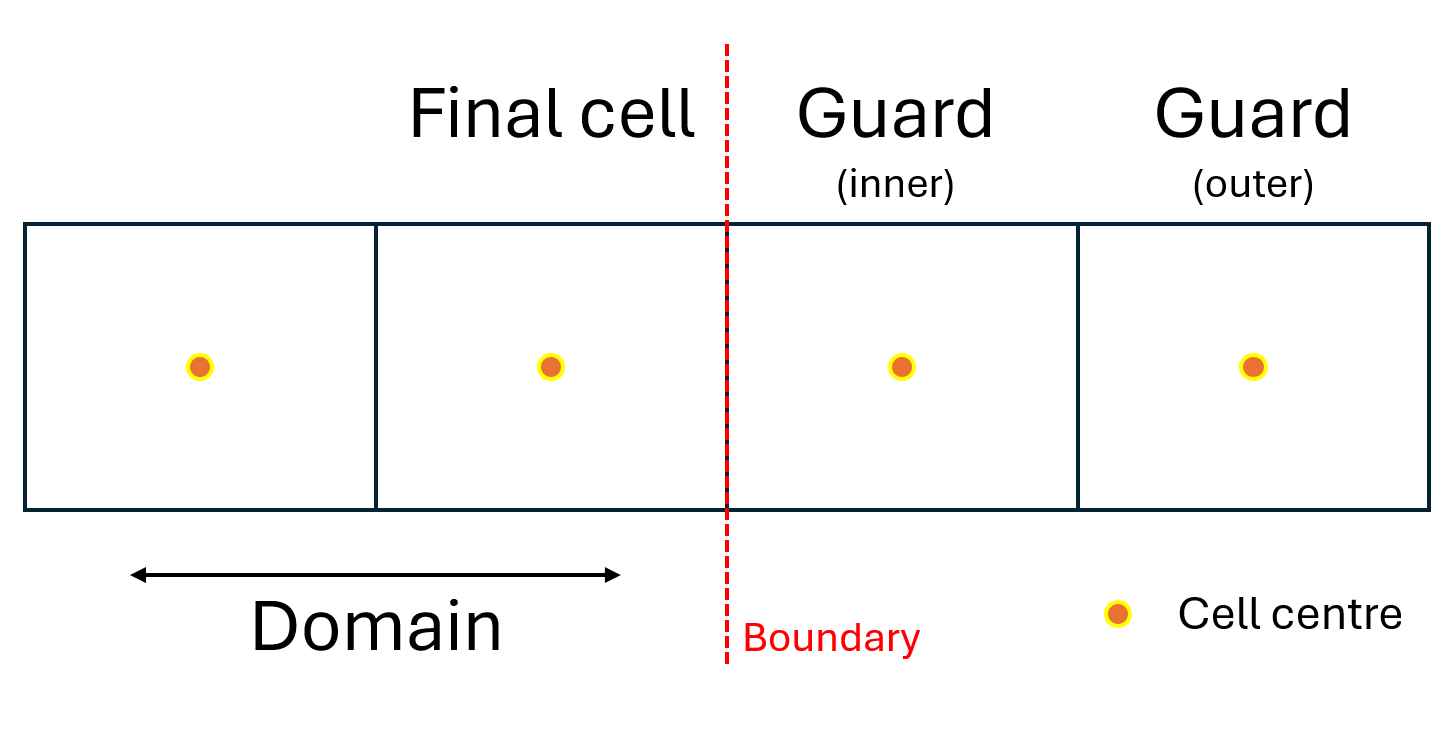
Fig. 1 Domain and guard cells. The outer guard cells are unused. The boundary value is calculated through interpolating between the final and inner guard cell centres.#
Cell face notation#
While all evolved variables are solved at cell centres, values at cell boundaries are often needed to calculate fluxes. The cell face notation is as shown in the below figure, where “low” and “up” refer to the negative and positive direction in index space, respectively. This notation is also used for diagnostics for values at the boundaries, such as flows of particles, energy and momentum (see Flow diagnostics convention).
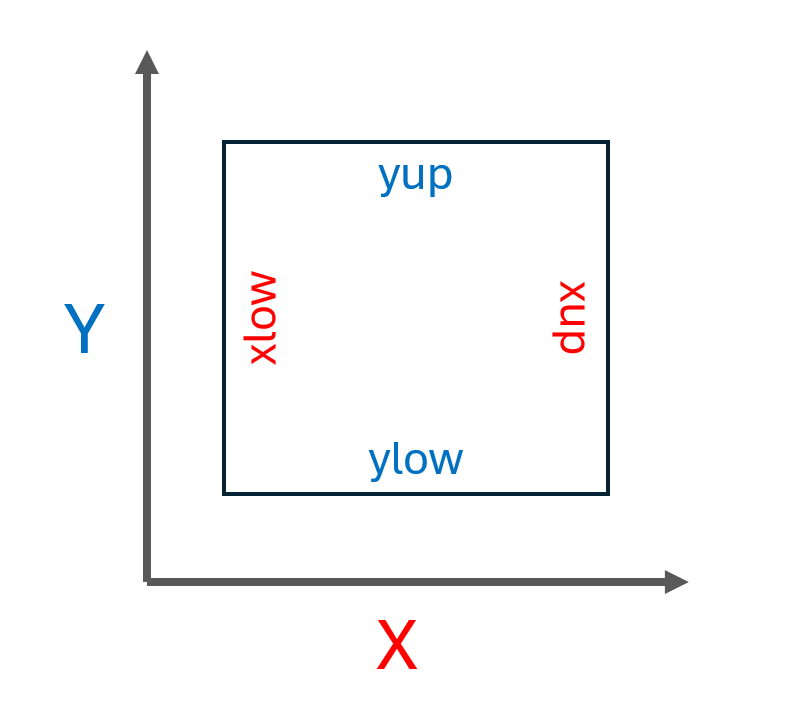
Fig. 2 Cell faces xlow, xup, ylow and yup.#
Gridding#
WIP
Hermes-3 can be configured using an analytically defined grid, see the relevant BOUT++ documentation. Tokamak geometry is currently generated by Hypnotoad, see the GitHub repo and documentation.
Grid redistribution and interpolation#
WIP
A useful strategy is to start with a low resolution grid, run until close to steady-state, then interpolate the solution onto a finer mesh and restart. This process can be repeated as a kind of simplified multigrid method.
Using grids to pass inputs to Hermes-3#
WIP
Metric coefficients#
The option hermes:recalculate_metric controls how the metric tensor is calculated.
By default recalculate_metric is false, meaning that the metric tensor
components (g11, g_22 etc.) are taken from the grid file.
Setting recalculate_metric to true causes Hermes-3 to read
Rxy, Bpxy and other geometric quantities from the grid file.
The metric tensor is recalculated to the orthogonal field-aligned
coordinate system described in the BOUT++ coordinate manual.
Note Previous Hermes-3 versions had an option loadmetric with
the same behavior but the opposite default (loadmetric=false
rather than recalculate_metric=true).
If hermes:recalculate_metric is false (the default), then the coordinate
metrics loaded from the grid file are usually in SI units. By default
normalise_metric is true, and the loaded metrics are
normalised using the Hermes-3 normalisation factors.
If recalculate_metric is set to true then the metrics will always
be normalised, and the normalise_metric option is not used.
The default BOUT++ behavior is to throw an exception if an option is
set but not used.